 |
||||
 |
||||
 |
|
|
|
|
 |
||
|
|
|
 |
|||||||||||||||||||
 |
|||||||||||||||||||
 |
|||||||||||||||||||
|
|||||||||||||||||||
Basic Repeater System Installation: |
|||||||||||||||||||
Repeater Section Antenna Section |
|||||||||||||||||||
Installing a repeater system is really quite simple. If you are a relatively handy person and can run wires throughout a building, installing a repeater system will be a cinch! If you are not that handy, consider using your network technician or maintenance staff to put your system in. The most difficult task in installing the system is running the wires. All of our repeater systems come with complete instructions and our staff is always here to provide free technical support via phone or email. |
|||||||||||||||||||
 |
|||||||||||||||||||
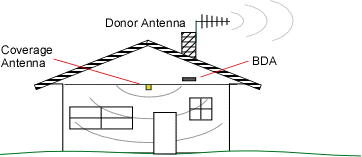
Here is a rough overview of a typical repeater system installation. Your system should come with at least the following items: (1) Donor Antenna (goes outside the building) (1) BDA - Bi-Directional Amplifier (1) Coverage Antenna (goes inside the building)! (2) Coaxial Communication Cables (1) Power Supply to 110VAC Step 1 Start by taking your phone up to the roof or other location outside to find where the signal is strongest. Step 2 Temporarily mount the Donor (outside) antenna in that location. You may need to adjust and move the antenna later. More notes on Donor antennas here. Step 3 Run coaxial cable into the building to a convenient loaction (attic, etc.) where you can also get standard 110VAC power for the BDA. Step 4 Place the BDA in that location and connect the coaxial cable to the Donor Side of the BDA and the donor antenna. Step 5 Mount your coverage (inside) antenna in a productive location. You may need to adjust or move the antenna later. More notes on Coverage antennas and patterns here. Step 6 Connect coaxial cable between the coverage antenna and the BDA output port. Step 7 Power up the system and check for signal inside the building. If needed, tune system by moving and or pointing the Donor and Coverage antennas until they get the most signal possible. Step 8 Secure all antennas and cables, securely mount the BDA and clean up the installation. You're finished! Of course there are still a few more things to consider but in general, this is the basic procedure. For more information, continue reading this tutorial. Full instructions are included with each repeater system. |
|||||||||||||||||||
|
|
|
|
|
|
|
|
|
|
|
|
|
|
|
|
|
|
|
|
 |
||
|
|
|
|
|
|
 |
||||||||
 |
||||||||
 |
 |
|||||||
|
|
|
|
|
|
|
|
|
This Site Copyright ©1996-2011 Criterion Cellular. All Rights Reserved. Some logos and graphics used are trademarks of their respective owners. Prices subject to change without notice. Not responsible for typographical or photographical errors. Some products may not be available in all areas. All prices are in US dollars. We reserve the right to modify product pricing and/or specifications without prior notice. We do not sell or rent our customer information - Privacy Notice. Site questions / comments / problems mail to Webmaster |
||
|
|
|
 |
||
|
|
|
. |
||
|
|
|
Antennas |
Amplifiers |
Adapters |
Repeaters |
Car Kits |
2.4 - 5.8 GHz |
Components |
Company |
Learning Center |


Verizon, AT&T, Nextel & Sprint Reception Experts Since 1990